Creating Personalized Images on Vista: A Guide for Creatives

Click For Summary

Discussion Overview

The thread centers around creating personalized images and banners using Vista Print, with participants sharing their experiences and challenges related to the design process and promotional offers.

Discussion Character

  • Anecdotal
  • Opinion-based
  • Technical explanation

Main Points Raised

  • One participant expresses difficulty in uploading personal images to Vista Print and seeks advice on creating custom designs.
  • Another participant offers to assist by guiding the original poster through the site if they share their design intentions.
  • One participant shares their current project involving a preset banner design and contemplates what additional text to include.
  • Several users discuss the potential clutter of adding services to the banner and suggest considering the intended use of the banner.
  • One participant mentions confusion regarding the limits on free offers from Vista Print and shares their experience with the changing terms of the promotions.
  • Another participant points out the fine print regarding the number of free items allowed per order, noting a change from previous offers.
  • One participant speculates that combining different offers in one order may not be permitted.

Areas of Agreement / Disagreement

Views differ regarding the clarity of Vista Print's promotional offers and the best approach to designing banners, with no clear consensus emerging on the optimal way to utilize the service.

Contextual Notes

Participants share personal experiences with Vista Print, focusing on design preferences and promotional offers without implying any official guidance from the company.

Who May Find This Useful

Consultants looking to create personalized marketing materials or banners for events may find the shared experiences and discussions relevant.

babywings76
Gold Member
Messages
7,266
All you creative people...

I want to make a banner on Vista, but don't like the pre-selected ones. It says I can upload my own personal image, but how on earth do I make one in the first place? Some of you have shared wonderful things, but I can't upload those images, cause it's just a copy and I can't edit the info. So, what's the best way to do things?
 
Amanda, Vista print can be challenging. If you post what you are trying to copy, I can walk you through making it using their site. Usually they charge $5 to upload, so if you can avoid that it makes it cheaper.
 
  • Thread starter
  • #3
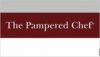
Still wondering what you all think...But in the meantime of waiting for all your responses....here's an update of one of my current projects...I decided to pick the preset banner that is basically 3 big stripes. Grey on top (1/3 of the banner), Cranberry in the middle (this is where I just put The Pampered Chef with the little Registered symbol), then it's white on the bottom third.So now I'm wondering if I should have anything else printed on it. A slogan, my name, or the services we offer: Cooking Shows, Wedding Registry, Fundraisers, Business Opportunity. But I'm not sure if that will clutter it up.
 
  • Thread starter
  • #4
Oh thanks Holly! You posted while I was typing. :) Let me see if I can save my draft image and upload it here for you to see. Or is there a better way?
 
  • Thread starter
  • #5
Okay, I think I got it here. So the sections aren't actually equal thirds. :D
 

Attachments

  • livepreview.aspx.jpg
    livepreview.aspx.jpg
    9 KB · Views: 376
That is lovely IMHO.
 
Amanda, Sorry I got distracted. Is that all you want it to say?
 
  • Thread starter
  • #8
Well, I'm debating if it should say the services we offer like I posted above. KWIM? Or is it too crowded?
 
What do you plan on using it for? Fairs? Shows? Hang it on your front porch? :D

Knowing what you want to do with it should help you figure out what you want it to say.
 
  • Thread starter
  • #10
This one is mainly for fair booths. It's a small one, though, so I'm not sure if it's going to end up being what I would want. But it's free, I just have to pay S&H. I can also make one into a yard sign and get one for free also...that can be for shows. So maybe that one I'll say something else.
 
  • Thread starter
  • #11
Okay, now I'm wondering why when I keep clicking on the Vista e-mail with the Free offers, why now that I'm done creating a bunch, they are only giving 2 of them to me for free. The others come up regular price. I noticed this as I was doing them. The first offer I clicked on came up free. Then when I clicked on the e-mail and went about creating the second item, it came up free, but amended the first one to being full price. Then the third item did come up free along with the 2nd one, but the first still had a charge. Now I did a fourth and the 4th and 3rd are free, but the 1st and 2nd aren't. I wonder if they've changed the way this works and now only let you get 2 free items per order?Anyone know more about this? Anyone place orders w/ multiple free items lately?
 
  • Thread starter
  • #12
bumping...I'd really like to get all 4 of these items, and I had created them each one by one by clicking on the Free offer in the e-mails, so I'm baffled.
 
I just looked at an email I got from Vista Print today. The fine print says:

FREE offers are not valid on any more than 4 items per order. Please note that Vistaprint reserves the right to rescind, revoke or terminate this offer at any time, with or without cause. This includes, without limitation, if the terms of the offer do not accurately describe our intent due to errors or omissions.

It used to be 10! Look at the email you are using... I can always forward you this one if you like.
 
  • Thread starter
  • #14
Well each offer has an expiration date, so maybe that's why. One of my projects came from an older offer. But, it was allowing it. It wasn't until I was adding the other offers onto it that it took the free away. I just have 4 projects, so doesn't that suit their parameters?
 
I don't think you can combine different offers in one order.
 

Frequently Asked Questions

What is Vista and how can it be used for creating personalized images?

Vista is an online design platform that allows users to create custom graphics, including personalized images for various purposes. It offers a range of templates, design tools, and resources that make it easy for creatives to produce high-quality visuals tailored to their needs.

Do I need design experience to create personalized images on Vista?

No, you do not need extensive design experience to create personalized images on Vista. The platform is user-friendly and provides a variety of templates and drag-and-drop features that make it accessible for beginners. Tutorials and guides are also available to help users get started.

What types of personalized images can I create on Vista?

You can create a wide variety of personalized images on Vista, including social media graphics, invitations, flyers, business cards, and promotional materials. The platform allows for customization of text, colors, and images to suit your specific needs.

Can I collaborate with others while creating personalized images on Vista?

Yes, Vista offers collaboration features that allow multiple users to work on a project simultaneously. You can share your designs with team members or clients, enabling real-time feedback and edits, which is particularly useful for group projects or client presentations.

Is there a cost associated with using Vista for creating personalized images?

While Vista offers a free version with basic features, there are also premium options available that provide access to additional templates, design elements, and advanced tools. Users can choose a subscription plan based on their needs and the level of functionality they require.

Similar Pampered Chef Threads

  • chefbritt
  • Business, Marketing and Customer Service
Replies
5
Views
1K
bsaxman
  • pc_jessica
  • General Pampered Chef Chat
Replies
4
Views
1K
3RingChef
  • babywings76
  • Pampered Chef Flyers
Replies
4
Views
2K
tpchefpattie
  • evvy
  • Pampered Chef Support Group
Replies
3
Views
2K
Admin Greg
  • lisasfuncooking
  • Pampered Chef Newsletters
Replies
4
Views
2K
pcjenr
  • KateD
  • Business, Marketing and Customer Service
Replies
4
Views
2K
AnaCash
  • c00p
  • Business, Marketing and Customer Service
Replies
4
Views
1K
etteluap70PC
  • KayPT
  • Pampered Chef Facebook Marketing
Replies
4
Views
2K
AnaCash
  • kam
  • Business, Marketing and Customer Service
Replies
22
Views
4K
chef131doreen
  • K_Jurich
  • Flyers and Letters
Replies
5
Views
1K
Mr. Pampered Chef
Back
Top