Can Someone Save a Page of HWC 2011 Products as a JPEG?

Click For Summary
SUMMARY

The forum discussion centers on the need for a flyer containing HWC 2011 products, specifically for printing multiple copies on a single page. Users share methods for creating a 4-up print layout using tools like Adobe Acrobat Reader and Microsoft Word. Key instructions include selecting "Multiple pages per sheet" in the print settings of Acrobat Reader and creating a 4-page PDF with fillable text fields. Participants express gratitude for shared resources and offer to create the desired flyers for others.

PREREQUISITES
  • Familiarity with Adobe Acrobat Reader for printing settings
  • Basic knowledge of Microsoft Word for document formatting
  • Understanding of PDF file creation and manipulation
  • Experience with flyer design and layout principles
NEXT STEPS
  • Learn how to use Adobe Acrobat Reader for advanced printing options
  • Explore Microsoft Word's capabilities for creating custom flyers
  • Research methods for converting PDF files to JPEG format
  • Investigate imposition software for more complex printing layouts
USEFUL FOR

This discussion is beneficial for graphic designers, event planners, and anyone involved in marketing or promotional activities who needs to create and print flyers efficiently.

doughmama
Silver Member
Messages
857
anyone have a flier with the HWC products, not with host specials. And last year I got a full page HWC order form that was perfect to give out and to add to my catalogs. Can anyone help with this? Thanks so much. here is the one I got from last year.
 

Attachments

  • Thread starter
  • #2
bumping, anyone?
 
You can probably find what you are looking for on CC.

Go to Promoting & Building Your Business...Charitable Giving...HWC

You will be taken to a page with all sorts of handouts.

Along the right hand side is a catalog insert (perfect for making 4-up if that's what you want) and an order form with pictures.

Hope this helps!
 
  • Thread starter
  • #4
I'll take a look. Thanks Kathleen.
 
kam said:
You can probably find what you are looking for on CC.

Go to Promoting & Building Your Business...Charitable Giving...HWC

You will be taken to a page with all sorts of handouts.

Along the right hand side is a catalog insert (perfect for making 4-up if that's what you want) and an order form with pictures.

Hope this helps!

I can tell my computer that I want 4 pages on one page but how do I tell it I want it to print the same page 4 times on the same piece of paper?
 
BethCooks4U said:
I can tell my computer that I want 4 pages on one page but how do I tell it I want it to print the same page 4 times on the same piece of paper?

OK OK...I always make mine up myself and never really deal with doing it in Acrobat...but I thought someone on here had once suggested printing 4-up out of reader at one time. I don't use Reader, so I just assumed it was true.

There doesn't really look to be a good way to do this in Reader without adding an imposition add-on. Sorry about that.

I can create this flyer 4-up if someone is interested...
 
If you go to printer settings you can choose there to print 4 to a page.
 
Does anyone have the HWC flyer or invitation with the 2011 products on it.
 
kam said:
OK OK...I always make mine up myself and never really deal with doing it in Acrobat...but I thought someone on here had once suggested printing 4-up out of reader at one time. I don't use Reader, so I just assumed it was true.

There doesn't really look to be a good way to do this in Reader without adding an imposition add-on. Sorry about that.

I can create this flyer 4-up if someone is interested...

Yes, pretty please with pink sugar on top :)

Kam your work is quite impressive! thank you for posting so much for us to use all the time. You are appreciated! :D
 
ilovpc said:
If you go to printer settings you can choose there to print 4 to a page.

Not with mine. I can do 4 pages on one sheet or I can do it to take 1/4 of the page but I can't tell it to make 4 of that one page on a single sheet.

Thanks Kam! As always you are awesome. What would we do without you! :love:
 
I was going to update mine from last year... probably will get to it this weekend.
 
OK, didn't have it in me today to create anything from scratch. Plus, I kind of like their flyer this year.

So, all I did was take HO's flyer and do 2 different things:

1. I created a 4 page pdf with the flyer as pages 1-4. I also placed a "fillable " spot at the bottom for you to type your info. Type your info in page 1 and it should repeat on the next 3 pages. Then, when you print, select the multiple pages option of 4 pages and all 4 pages will print on one page.

2. I pasted the flyer image 4-up in a Word doc. You can move them around as you like. I also placed text boxes at the lower right of each one for you to type your info.

Hopefully, one of these will work for anyone who wants a 4-up HWC printout.
 

Attachments

Last edited:
Hmmm... ok Kam... I do not have the same option to print more than one page on a single sheet when it's a pdf that I do with a word doc. What's that about or what am I missing??
 
BethCooks4U said:
Hmmm... ok Kam... I do not have the same option to print more than one page on a single sheet when it's a pdf that I do with a word doc. What's that about or what am I missing??

OK, I got scared for a minute! I never use Reader so I get very confused about what it can and (mostly) can't do! :)

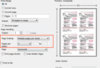
In Acrobat Reader, choose Print.
On the Print dialog box, choose the drop down next to Page Scaling and change it to "Multiple pages per sheet"
Then change Pages per sheet to "4".

Let me know if this works for you.

I am going to try to attach an image.
 

Attachments

  • pdfprint4up.jpg
    pdfprint4up.jpg
    33.1 KB · Views: 620
Thank you Kam...I learned something new...And, Thank you very much for the flyer
 
kam said:
OK, I got scared for a minute! I never use Reader so I get very confused about what it can and (mostly) can't do! :)

In Acrobat Reader, choose Print.
On the Print dialog box, choose the drop down next to Page Scaling and change it to "Multiple pages per sheet"
Then change Pages per sheet to "4".

Let me know if this works for you.

I am going to try to attach an image.

Well, look at that! There it is.

Thanks again Kam!
 
  • Thread starter
  • #17
Thank you Kathleen (Kam). This is exactly what I was looking for. I am mailing out minis for invitations this season and nice to be able to add the HWC products in the envelope without having to print and pay for a full color page. Greatly appreciate your work and your lesson.:)
 
as always ur awesome!!!!!!! thanks!
 
Hey, Kam! Can you pretty please do this with the Father's Day Special. Or how about a page with the HWC and Father's Day both on half a page, twice on that page (like you did with the top of the one with the host & guest special on top and the Father's Day on the bottom).

THANK YOU for all you do for us!!
 
Is it possible for someone to save one page of the HWC 2011 products as a jpeg? I could not figure out how to do it.Thanks!
 

Frequently Asked Questions

Can I save a page of HWC 2011 products as a JPEG?

Yes, you can save a page of HWC 2011 products as a JPEG by taking a screenshot of the page and then saving that screenshot in the JPEG format.

What tools can I use to capture a screenshot for HWC 2011 products?

You can use built-in screenshot tools on your computer or device, such as Snipping Tool or Snip & Sketch on Windows, or Command + Shift + 4 on Mac. There are also various third-party applications available for capturing screenshots.

Is there a specific resolution I should aim for when saving as a JPEG?

When saving as a JPEG, aim for a resolution that maintains clarity and detail. A resolution of at least 300 DPI is recommended for high-quality images, especially if you plan to print the image later.

Can I edit the JPEG after saving it?

Yes, once you have saved the page as a JPEG, you can use image editing software like Adobe Photoshop, GIMP, or even online tools to edit the image as needed.

Are there any copyright issues with saving and using HWC 2011 product images?

Yes, be aware that images of HWC 2011 products may be protected by copyright. It’s important to use them only for personal use or with permission from the copyright holder if you plan to share or distribute them.

Similar Pampered Chef Threads

Replies
2
Views
1K
Admin Greg
Replies
4
Views
3K
tpchefpattie
  • doughmama
  • Buy and Sell Items
Replies
10
Views
2K
thehaleykitchen
  • Chef Kearns
  • Flyers and Letters
Replies
12
Views
2K
Chef Kearns
  • collierpchef
  • Flyers and Letters
Replies
2
Views
1K
collierpchef
  • MissyPC
  • Pampered Chef Sales
Replies
2
Views
3K
Hollycancook
Replies
4
Views
1K
Wildfire
  • ChefBevShu
  • Pampered Chef Flyers
Replies
2
Views
1K
Admin Greg
Replies
14
Views
3K
littlemaisyPC
  • PamperedChefLayla
  • General Pampered Chef Chat
Replies
2
Views
1K
cathyskitchen
Back
Top