Transfer Info From Desktop to Laptop

Click For Summary

Discussion Overview

This thread revolves around the challenges and experiences related to transferring information from a desktop to a laptop, with a focus on backup methods. Participants share their personal experiences with various storage devices and engage in light-hearted banter about terminology and the nature of their devices.

Discussion Character

  • Anecdotal
  • Opinion-based
  • Meta-discussion

Main Points Raised

  • One participant inquires about transferring information from a desktop to a laptop, expressing difficulty with using a CD for backup.
  • Another participant suggests using a jump drive as a reliable backup method.
  • Several users mention their experiences with different types of flash drives, including one participant identifying as a consultant who uses a LEXAR device.
  • Participants engage in humorous exchanges about the names of their storage devices, referring to them as "thing-a-ma-jigs" and sharing anecdotes related to them.
  • One participant shares a concern about a flash drive that was dropped in water and wonders if it still works.
  • There is a playful discussion about the size and capabilities of their devices, with some expressing "thing-a-ma-jig envy."
  • Participants reflect on the tendency of the group to divert from the original topic, noting the humorous nature of their discussions.

Areas of Agreement / Disagreement

Views differ on the best method for backing up information, with some participants favoring jump drives while others share various experiences. There is no clear consensus on a single preferred method, but there is general agreement on the light-hearted nature of the conversation.

Contextual Notes

The discussion showcases a mix of technical inquiries and humorous interactions among participants, highlighting the community's camaraderie and informal communication style.

Who May Find This Useful

Participants within the consultant community who are exploring backup options for transferring data may find the shared experiences and light-hearted exchanges relevant.

mandydollie
Messages
433
does anyone know how I transfer the information that I have on my desktop in PP to my laptop?

I tried a backup to a CD, but PP won't let me pick the drive that my CD is in....

HELP!!!
 
what do you normally back up to? do you have a jump drive? or an ipod nano or video?
 
A jump drive is the best way to go. Back up to the jump drive, take it to the desktop and restore from the jump drive. They're getting cheap, too. Online is where you can get the lowest prices but even Office Max has half gig jump drives at pretty low prices.
 
  • Thread starter
  • #4
oh..my soon to be hubby has a jump drive i do believe...thanks guys!
 
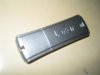
I backup to a little thing that says LEXAR. It's silver and can connect to my keychain and I have no clue what it's called. But wait - thanks to Jilleysue I can snap a pic of it, shrink th epic and post it here!!
 

Attachments

  • TestShots 107 (Large).jpg
    TestShots 107 (Large).jpg
    12.5 KB · Views: 422
  • Thread starter
  • #6
yep...his thingymajig (nice word, huh) looks similar... thanks! I'll take care of that tomorrow.
 
dannyzmom said:
I backup to a little thing that says LEXAR. It's silver and can connect to my keychain and I have no clue what it's called. But wait - thanks to Jilleysue I can snap a pic of it, shrink th epic and post it here!!

HAHAHAHAHAHAHAHA....OH SEEE....EVERYONE MUST GET THAT LINK!!!
IT SAVES THE WORLD!
YES I USE ONE OF THOSE TOO! Kevin just informed it is called a FLASHDRIVE...lol
 
haha....flashdrive, jumpdrive or thumbdrive, i've heard all :)
 
Jilleysue said:
HAHAHAHAHAHAHAHA....OH SEEE....EVERYONE MUST GET THAT LINK!!!
IT SAVES THE WORLD!
YES I USE ONE OF THOSE TOO! Kevin just informed it is called a FLASHDRIVE...lol

tHANKS kEVNI! hE'S TAUGHT ME two NEW THINGS TONIGHT AND i HAVE NEVER EVEN MET THE GUY!
 
mandydollie said:
yep...his thingymajig (nice word, huh) looks similar... thanks! I'll take care of that tomorrow.
Now, let's not go posting pics of someone's thing-a-ma-jig, okay?
 
The_Kitchen_Guy said:
Now, let's not go posting pics of someone's thing-a-ma-jig, okay?

Bahahahahahahaha:eek:
 
The_Kitchen_Guy said:
Now, let's not go posting pics of someone's thing-a-ma-jig, okay?

My Thing-a-ma-jig is bigger then your Thing-a-ma-jig! Holds more, works faster and is portable...bwaaaahahahahaaa :eek:
 
I have that same one Carolyn. My daughter dropped it in the sink full of water this weekend. I haven't tried it ou tyet to see if it still works!
 
thechefofnorthbend said:
My Thing-a-ma-jig is bigger then your Thing-a-ma-jig! Holds more, works faster and is portable...bwaaaahahahahaaa :eek:

I don't know that working faster is necessarily a good thing for a thing-a-ma-jig. :o

OK- I'll pull my mind out of the gutter now.
 
PChefAbey said:
I have that same one Carolyn. My daughter dropped it in the sink full of water this weekend. I haven't tried it ou tyet to see if it still works!

Ya know, some thing-a-ma-jigs are waterproof!
 
  • Thread starter
  • #16
i like my thing-a-ma-jig..... i guess my small town girl homemade word was a hit? OR... possibly.... you're all just making fun of me... which knowing this group is more the case...... :)
 
thechefofnorthbend said:
My Thing-a-ma-jig is bigger then your Thing-a-ma-jig! Holds more, works faster and is portable...bwaaaahahahahaaa :eek:
I think I have serious Thing-a-ma-jig envy.
 
chefann said:
OK- I'll pull my mind out of the gutter now.
[Puts mark on calendar]

Let's see how long this one lasts.
 
mandydollie said:
i like my thing-a-ma-jig..... i guess my small town girl homemade word was a hit? OR... possibly.... you're all just making fun of me... which knowing this group is more the case...... :)

1. We NEVER make fun of anyone (at least to their knowledge) without the prior consent of others who have already treaded that path with much success (and then we all just jump on the bandwaggon).
2. If you see your name or find yourself amongst conversation between the good folk on this forum...RUN!!! (be blessed, that means we are willing to tolerate you either until we get tired of talking about you or you present us with a lawsuit, whichever comes first):p

Bwaaahahahaaaaaaaa....[evil laugh] :D
 
Last edited:
  • Thread starter
  • #20
man... i just took my lawyer off of speed dial!!!!ha ha
 
mandydollie said:
i like my thing-a-ma-jig..... i guess my small town girl homemade word was a hit? OR... possibly.... you're all just making fun of me... which knowing this group is more the case...... :)
We are not making fun of you, on the contrary, we are very appriciative of the fact that you (inadvertantly) lobbed up a softball at which, several of us took a free swing.

Whether it's a thing-a-ma-jig, thingy, doohickey, whatchamacallit, whosit or thing-a-ma-bob, this crew will find a way to have some fun with it.

And as long as what-ever-it-is transfers your files successfully, who cares what our gang does with it?

(Anne, still have those patent leather boots?)
 
  • Thread starter
  • #22
That's what I love about this group... a simple question like how the heck do I transfer my info... turns into a couple page discussion about something completely unrelated!
 
mandydollie said:
That's what I love about this group... a simple question like how the heck do I transfer my info... turns into a couple page discussion about something completely unrelated!

Yes I agree.. we are a cooky bunch aren't we!!

Cheers
 
Are you accusing us of hijacking threads? Us? Would we do a thing like that?[hijack] Does anyone know where I can get wrought iron hooks to make my own cookware hanging rack? [/hijack]
 
ChefAggi said:
Yes I agree.. we are a cooky bunch aren't we!!

Cheers
I'm not sure all of us get into a cooky baking mood.
 
  • Thread starter
  • #26
ohhhh.. cookies sound good!!!! :)
 
You have to clean out your cookies once and awhile, too, because they can really slow down your system.
 
The_Kitchen_Guy said:
Are you accusing us of hijacking threads? Us? Would we do a thing like that?

[hijack] Does anyone know where I can get wrought iron hooks to make my own cookware hanging rack? [/hijack]

Try these...Ive used them before

http://www.guadalupeforge.com/shooks.html (for making your own)

http://www.kitchensource.com/pot-racks/av-welcome.html (they have a nice premade selection)

http://www.allpotracks.com/Pot-Rack-Hooks-C8508.html (all kinds of styles here)

HTH!
 
Well, thanks for the tip - except guadalupe forge has discontinued the hooks :( and the other two aren't quite what I'm looking for. But you had three more sources than I've found so far!
 
The_Kitchen_Guy said:
(Anne, still have those patent leather boots?)
Maybe. ;)

The_Kitchen_Guy said:
[Puts mark on calendar]
Let's see how long this one lasts.)
Not very long at all....

But wasn't that my original point? Sometimes you don't want a thing-a-ma-jig that's faster.

mandydollie said:
i like my thing-a-ma-jig..... i guess my small town girl homemade word was a hit? OR... possibly.... you're all just making fun of me... which knowing this group is more the case......
If we didn't like you, we wouldn't waste the brain power thinking up the jokes.

There should be a warning on the Chef's Lounge: Enter at Your Own Risk. Denizens are Feisty and May Talk Back.
 

Frequently Asked Questions

How do I transfer my Pampered Chef files from my desktop to my laptop?

You can transfer your Pampered Chef files by using a USB flash drive, cloud storage (like Google Drive or Dropbox), or by emailing the files to yourself. Simply copy the files from your desktop to the chosen medium and then access that medium on your laptop to complete the transfer.

Can I use an external hard drive to transfer my Pampered Chef data?

Yes, using an external hard drive is a great option for transferring data. Just connect the external hard drive to your desktop, copy the Pampered Chef files onto it, and then connect the drive to your laptop to copy the files over.

Is it possible to transfer my Pampered Chef data wirelessly?

Yes, if both your desktop and laptop are connected to the same Wi-Fi network, you can use file-sharing features available in your operating system. For Windows, you can use the 'Nearby sharing' feature, and for Mac, you can use AirDrop to transfer files wirelessly.

What should I do if I encounter issues while transferring files?

If you encounter issues, first check your internet connection if you're using cloud storage. Ensure that the files are not too large for email attachments if you're emailing them. Additionally, verify that the USB or external drive is properly connected and functioning. If problems persist, consider restarting both devices.

Do I need to install any software on my laptop to access my Pampered Chef files?

Typically, you do not need to install any additional software to access your Pampered Chef files, as they are usually standard file types. However, if you used specific software on your desktop to create or manage those files, you may need to install the same software on your laptop to access them properly.

Similar Pampered Chef Threads

  • cjwagner
  • General Pampered Chef Chat
Replies
5
Views
1K
wadesgirl
  • pampchefrhondab
  • General Pampered Chef Chat
Replies
9
Views
2K
pampchefrhondab
  • ahammons
  • General Pampered Chef Chat
Replies
3
Views
1K
chefann
  • grainsmommy
  • General Pampered Chef Chat
Replies
13
Views
2K
kristenlee
  • luvmypomeranian
  • Business, Marketing and Customer Service
Replies
13
Views
3K
angel7581
  • Chef.Wanda
  • Business, Marketing and Customer Service
Replies
2
Views
1K
Chef.Wanda
  • medhatterchef
  • Business, Marketing and Customer Service
Replies
2
Views
1K
medhatterchef
  • ChefJoyJ
  • Business, Marketing and Customer Service
Replies
4
Views
2K
PChefPEI
  • cewcooks
  • General Pampered Chef Chat
Replies
2
Views
1K
Admin Greg
  • Aurora
  • Business, Marketing and Customer Service
Replies
5
Views
1K
Aurora
Back
Top