Are These Designs Too Busy? Feedback Needed!

Click For Summary

Discussion Overview

The thread centers around feedback on new business card and postcard designs for a Christmas sale. Participants share their thoughts on the aesthetics and content of the designs, as well as their personal experiences with similar products.

Discussion Character

  • Opinion-based
  • Anecdotal

Main Points Raised

  • One participant, identifying as a consultant, expresses a desire for critique on the designs, questioning if they appear too busy.
  • Several users mention that they find the designs appealing, with one participant stating "they look great."
  • Another participant suggests a change in the order of information on the business card to emphasize income-producing activities.
  • One participant shares their experience with ordering from VistaPrint and discusses the costs associated with different printing options.
  • Another participant appreciates the idea of including a recipe on the back of the business card, referencing a similar concept from another user.
  • One participant notes a technical issue with uploading the business card design, while others express excitement about the shiny elements of the cards.

Areas of Agreement / Disagreement

General agreement exists regarding the attractiveness of the designs, though there are differing opinions on specific content and layout choices.

Contextual Notes

Participants share personal experiences related to designing and ordering promotional materials, particularly through VistaPrint, and discuss the implications of branding in their designs.

Who May Find This Useful

Consultants looking for feedback on promotional materials or those interested in design ideas for business cards and postcards may find this discussion relevant.

KellyTheChef
Gold Member
Messages
7,533
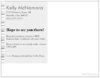
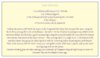
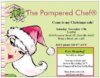
Before I order these...anyone want to critique them? Are they too busy?

One is the postcard invite for a Christmas sale...

The other is a new business card with a recipe on the back!


ETA: Look down at posts #5 and #6...they are posted there and you don't have to open them!!
 

Attachments
  • Christmas Sale Postcard Invite.jpg
    Christmas Sale Postcard Invite.jpg
    23 KB · Views: 476
  • Christmas Sale Postcard Invite Back.jpg
    Christmas Sale Postcard Invite Back.jpg
    8.1 KB · Views: 525
  • Foil Business Card with Recipe.jpg
    Foil Business Card with Recipe.jpg
    13.5 KB · Views: 578
Last edited:
they look great kelly
 
and i only have 4 more posts to reach my daily goal


*sorry for the hijack* :)
 
  • Thread starter
  • #4
Ugh! For some reason I can't get the FRONT of the business card to upload!
 
  • Thread starter
  • #5
Yea! Here it is!! The "shiny" parts are going to be foil!


http://i156.photobucket.com/albums/t24/KellyTheChef/livepreview.gif


http://i156.photobucket.com/albums/t24/KellyTheChef/FoilBusinessCardwithRecipe.jpg
 
Last edited:
  • Thread starter
  • #6
http://i156.photobucket.com/albums/t24/KellyTheChef/ChristmasSalePostcardInvite.jpg

http://i156.photobucket.com/albums/t24/KellyTheChef/ChristmasSalePostcardInviteBack.jpg
 
Looks good to me. The only note I have for you is that RSVP includes "please" so it's technically redundant. You're better off replacing "please" with a deadline date. RSVP by 11/16. Just my .02 ;-)
 
  • Thread starter
  • #8
Thanks Cath!
 
Looks great. My only suggestion is that you change the order of the kitchen needs on your business card.

Start with shows, business... and end with tips and replacements. Put the focus on your main functions and your income producing activities. I would definitely keep the others in there though to show that you offer customer service and it's important to you.
 
kelly
i love those business cards

r those from vista print?
 
Where are these from? They're very cute:D
 
  • Thread starter
  • #13
Yes, they are from VistaPrint! I had to use their free (sometimes free) design your own card. I couldn't find that apron on any of their pre-set up cards. I have to admit...most of the idea for my card came off of Alison's cards (gourmetgirl) Since I have been seeing so many cards coming in for the card swap, I set hers aside since I liked it the best!

Beth- I totally agree with your point about putting the "best" that I have to offer on the card first...I just set it up that way so it would visually LOOK nicer...smallest on the top on down to the largest (most letters) on the bottom. Maybe I will go mess around with it and see if it looks OK without them being set up like that!

I really appreciate all the constructive comments! That's what I need! Since these are the premium cards, have foil accents, and a full color back...they certainly are not going to be free. I have two other business card set ups that I have gotten mostly for free, but I am just not happy with them! So, if I am going to spend the $$ to get nice ones, I want them PERFECT so I am glad that I did it!
 
Very cute... I can't read the type on the back of the bus. card but I love the idea of putting a recipe on the back of your card. I'm guessing you're ordering from vista print... what do they cost with the backs printed? I am waiting for my first order of postcards from them--I personalized some cards to use as thank you notes for bookings, and I also ordered a tiny rubber stamp to stamp my name/website/phone onto the glossy recipe cards from PC (my big stamp takes up too much space on the card).
 
  • Thread starter
  • #15
I placed my order! I ended up getting all of this for $47:

500 PREMIUM, FOIL, FULL COLOR BACK business cards
10 large calender magnets
100 postcards (for my Christmas sale invite)
1 sticky pad
2 small stamps that say "Thank You" will use these as giveaways when I am a director
one note pad that looks like this:
http://i156.photobucket.com/albums/t24/KellyTheChef/NotePad.jpg

Here are the cards I ordered:

http://i156.photobucket.com/albums/t24/KellyTheChef/livepreview-1.gif
 
  • Thread starter
  • #16
dwyerkim said:
Very cute... I can't read the type on the back of the bus. card but I love the idea of putting a recipe on the back of your card. I'm guessing you're ordering from vista print... what do they cost with the backs printed? I am waiting for my first order of postcards from them--I personalized some cards to use as thank you notes for bookings, and I also ordered a tiny rubber stamp to stamp my name/website/phone onto the glossy recipe cards from PC (my big stamp takes up too much space on the card).
Black and white printing would add about $6 I think...the full color added $12. The foil accents were $15 for 250 cards, but it only went up to $20 for the 500 cards that I ordered. The cards were the only thing I ordered that weren't free. Then shipping was about $8.
 
  • Thread starter
  • #17
dwyerkim said:
Very cute... I can't read the type on the back of the bus. card but I love the idea of putting a recipe on the back of your card. I'm guessing you're ordering from vista print... what do they cost with the backs printed? I am waiting for my first order of postcards from them--I personalized some cards to use as thank you notes for bookings, and I also ordered a tiny rubber stamp to stamp my name/website/phone onto the glossy recipe cards from PC (my big stamp takes up too much space on the card).

I got the idea about the recipe from Ann on here...she did an artichoke salsa recipe on the back of her cards...the front had an artichoke design- so cool!

Here is the recipe/wording I used:

Garlic Quick Bites


1 can of buttermilk biscuits (7.5 - 10.5 oz)

1 or 2 cloves of garlic

2 Tbs. of Pampered Chef Italian Seasoning Mix, Divided

3 Tbs. of butter

4 Tbs. of Parmesan cheese (optional)


Preheat the oven to 350° Melt the butter in the Pampered Chef Sauté Pan on top of the stove. Using the Garlic Press, press garlic in the melted butter. Sprinkle 1 1/2 tbs of Italian Seasoning on top. (Add ¾ of the Parmesan cheese into the butter, garlic & seasoning.) Using the serrated bread knife, cut each of the biscuits into 4 pieces. Toss pieces in the butter mixture. Then, arrange them in a single layer in the bottom of the cookware (some may go up the sides). Sprinkle with the remaining Italian Seasoning Mix (and cheese). Place in the oven at 350° for 10-12 minutes, or until golden brown. Slide onto a platter, and use the small serving tongs to serve the pieces.

Variation: Instead of garlic and Italian seasonings, use a combination of 2 teaspoons Pampered Chef Korintje Cinnamon (or Cinnamon Plus) and 3-4 tablespoons brown sugar.
 
Kelly, I LOVE your cards....they are AWESOME! I love the shiny purple! (Also a big "Prince" fan! :cool: )

Great job. Very different.
 
Kelly, I love them too! You know, for some reason I have been thinking this whole time that we couldn't say "The Pampered Chef" if we used Vista. DUH! It just clicked that THAT isn't the logo!!! Now I have to get some!
 
  • Thread starter
  • #20
Debi~

Yep! Just make sure you don't use our tag line...Discover the chef in you or anything resembling the tag line...that's a no-no! And make the ® sign after TPC! (Hold down the alt key while typing in 0174 to make that symbol!)

I am soooooooooo loving the apron art on these cards!
 
They look great Kelly!
 
KellyTheChef said:
Debi~

Yep! Just make sure you don't use our tag line...Discover the chef in you or anything resembling the tag line...that's a no-no! And make the ® sign after TPC! (Hold down the alt key while typing in 0174 to make that symbol!)

I am soooooooooo loving the apron art on these cards!
For the life of me I couldn't figure out how to make the R in a circle symbol when I ordered my thank you postcards... the distribution isn't super wide so I"m not that concerned about it, but now I'll know in the future. Thanks!
 
Okay, I'm trying to do the ALT-0174 on Vista, and it's not working. I'm typing in a field creating my own design. Am I doing something wrong?
 
Sometimes you need to use the number pad instead of the numbers above the alphabet.
 
I have a laptop with no number pad. I think it would work if I could turn on the keypad lock (under the alpha keys), but I don't know how to do that. For example, the "U" key has a "4" and a backwards arrow on it in grey. If I hit ALT FN U, it does the same as hitting the back button on your browser. But I can't figure out how to get to the 4. Does that make sense?
 
In that case, Chelsea, you'll need to use the special character button on VistaPrint. It looks like an a with an accent. Click that, then click the R.
 
HaHa! I figured out how to do the number lock. Thanks Ann! :)
 
Is the recipe easy to read on the back of the bus card? I have never seen one with a recipe on the back.
 
Mine is. It's a really short recipe, so I didn't have to go too small on the font. http://i210.photobucket.com/albums/bb315/chefann1138/BC2.jpgI used the greyscale back, and it's very nice.
 

Frequently Asked Questions

What does it mean when someone asks if designs are too busy?

When someone asks if designs are too busy, they are typically inquiring whether the visual elements of a design are overwhelming or cluttered. A "busy" design may have too many colors, patterns, or elements that can distract from the main message or purpose of the design.

How can I determine if a design is too busy?

To determine if a design is too busy, consider the following: Is the main message clear? Are there too many competing elements that draw attention away from the focal point? You can also seek feedback from others to get a fresh perspective on the design's effectiveness.

What are some signs that a design might be too busy?

Signs that a design might be too busy include a lack of white space, excessive use of fonts or colors, and difficulty in identifying the main message or call to action. If viewers struggle to focus on key elements, the design may need simplification.

How can I simplify a busy design?

To simplify a busy design, start by reducing the number of colors and fonts used. Incorporate more white space to allow elements to breathe, and focus on one main message or image. Removing unnecessary details can also help clarify the design.

Is it important to get feedback on design choices?

Yes, getting feedback on design choices is crucial. It provides insights from different perspectives and can highlight issues you may not have noticed. Constructive feedback can lead to improvements and ensure that the design resonates with the target audience.

Similar Pampered Chef Threads

  • chefjeanine
  • Business, Marketing and Customer Service
Replies
2
Views
4K
Admin Greg
  • lisacb77
  • Business, Marketing and Customer Service
Replies
2
Views
1K
Admin Greg
  • erigby
  • Business, Marketing and Customer Service
Replies
6
Views
2K
cookingwithdot
  • Jules711
  • Sell Pampered Chef Items
Replies
21
Views
7K
Jules711
  • ChefSandyK
  • Business, Marketing and Customer Service
Replies
4
Views
2K
pamperedbecky
  • pampered1224
  • Business, Marketing and Customer Service
Replies
25
Views
5K
ChefNelson
  • mrssyvo
  • Business, Marketing and Customer Service
Replies
6
Views
2K
mrssyvo
  • janetupnorth
  • General Pampered Chef Chat
Replies
21
Views
2K
janetupnorth
  • mrssyvo
  • Business, Marketing and Customer Service
Replies
5
Views
2K
pamperedpals
  • WendyE
  • Pampered Chef Facebook Marketing
Replies
16
Views
5K
NooraK
Back
Top