Effortlessly Print Host and Guest on One Page: Adobe Tips from Kam

Click For Summary
SUMMARY

This discussion provides clear instructions for printing multiple pages on a single sheet using Adobe Reader 9 and Acrobat Pro. Users can access the print dialog, select "Multiple" under page scaling, and set the orientation to Landscape for optimal results. For printing two identical pages, participants suggest creating a multi-page PDF with the same content repeated. The limitations of Adobe Reader in combining PDFs are noted, with recommendations for alternative free PDF tools available for users lacking Acrobat Pro.

PREREQUISITES
  • Familiarity with Adobe Reader 9 and Acrobat Pro
  • Understanding of PDF file formats
  • Basic knowledge of printing settings and options
  • Awareness of alternative PDF software for combining documents
NEXT STEPS
  • Learn how to create multi-page PDFs in Acrobat Pro
  • Explore free PDF tools for combining documents
  • Research advanced printing options in Adobe Reader X (10)
  • Investigate methods for scanning and saving documents as PDFs
USEFUL FOR

This discussion is beneficial for graphic designers, office administrators, and anyone needing to optimize their printing processes using Adobe software.

Nanisu
Gold Member
Messages
1,199
I know you emailed me once before about how to print the host and guest on one page in Adobe (in the print menu), but I forgot...can you tell me again how to save it and and print it so that I have them both on one page, or if the host special is two pages, how to print them both on one page in landscape? Thanks for your help.
 
I'm not KAM, but if you can print 2 pages on a sheet by clicking on Print > Multiple > choose 2 from the drop-down menu.
 
Hi Nancy,

If it is a 2 page pdf, you can print both pages side by side.

In the PRINT dialog:

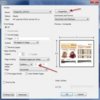
Change page scaling to multiple pages per sheet and you should be able to change those options that appear as I have in the picture (Custom, 2 x 1).

Also, go to Properties and change your orientation from Portrait to Landscape.

This is for READER 9 (I know READER X (10) is different but I have not changed mine yet so I don't know if the Print dialog looks the same).

HTH
 

Attachments

  • 10-22-2012 4-03-26 PM.jpg
    10-22-2012 4-03-26 PM.jpg
    33.4 KB · Views: 647
Last edited:
But what if we want two of the same thing on one sheet. Or two different docs both printed on one sheet. I have to print it as though it's 2 pages and turn the paper and print again then one is upside down but it works when I'm cutting them into two flyers.

I guess another option would be to scan a page twice and save as PDF and then print as 2 on a page...
 
BethCooks4U said:
But what if we want two of the same thing on one sheet. Or two different docs both printed on one sheet. I have to print it as though it's 2 pages and turn the paper and print again then one is upside down but it works when I'm cutting them into two flyers.

I guess another option would be to scan a page twice and save as PDF and then print as 2 on a page...

I have Acrobat Pro, so I am not all that familiar with Reader.

The way to print 1 page 2-up or 4-up is to create a pdf with the same page that many times. If I wanted 4-up of a single pdf, I would create a 4-page pdf with the same pdf as all 4 pages. Then I could print multiple as described above.

But, the problem is that (I am almost certain) that you can not combine pdfs with Reader.

You may be able to download another pdf program (there are free ones that have been mentioned by others) that may do this.

Since I have Acrobat Pro, I have never had to try this with one of the free programs...or struggle how it may be done with Reader. I just create the 4-pg pdf and go. So, there may be a different way, I just have never had to figure out another way.

Sorry, I could not be more help.

If you wanted a 1-page special repeated 2 or 4 times in a pdf, you can always ask on here. I would be happy to do it and I am sure there are others who are able to do this and wouldn't mind.
 

Frequently Asked Questions

What is the purpose of "Effortlessly Print Host and Guest on One Page: Adobe Tips from Kam"?

This resource aims to provide direct sales consultants, particularly those in Pampered Chef, with efficient methods to print host and guest information on a single page using Adobe software. It simplifies the process of organizing and presenting information for events and parties.

What Adobe software is recommended for printing host and guest information?

Adobe Acrobat and Adobe InDesign are commonly recommended for this purpose. These programs offer robust features that allow users to customize layouts and ensure that all necessary information fits neatly on one page.

Are there specific templates provided in the tips from Kam?

Yes, Kam often shares templates that can be used as a starting point. These templates are designed to be user-friendly and can be easily modified to fit individual needs, making it simpler for consultants to create professional-looking documents.

Can I use these tips if I'm not familiar with Adobe software?

Absolutely! Kam's tips are designed to be accessible for users of all skill levels. The guidance provided includes step-by-step instructions that help beginners navigate Adobe software effectively.

Is there a cost associated with accessing Kam's tips?

Typically, Kam's tips are shared for free through various platforms, such as webinars, social media, or direct sales training sessions. However, it's always a good idea to check the specific source for any potential fees associated with advanced resources or workshops.

Similar Pampered Chef Threads

  • kam
  • Flyers and Letters
Replies
6
Views
3K
Admin Greg
Replies
2
Views
1K
kam
  • kam
  • Flyers and Letters
Replies
4
Views
2K
raebates
  • robin stone
  • Flyers and Letters
Replies
5
Views
2K
vgibsonrn
Replies
7
Views
2K
pamperedhicks
  • kam
  • Flyers and Letters
Replies
2
Views
2K
dannyzmom
Replies
2
Views
2K
Admin Greg
  • kam
  • Flyers and Letters
Replies
5
Views
2K
ChipLines
  • Nanisu
  • General Pampered Chef Chat
Replies
4
Views
1K
3RingChef
Replies
2
Views
2K
dannyzmom
Back
Top