What are some free things you can get from Vista Print?

Click For Summary

Discussion Overview

This thread explores various free offerings from Vista Print, particularly focusing on items that Pampered Chef consultants can utilize for their business. Participants share their experiences with ordering products, discuss design ideas, and seek advice on using trademarks in their materials.

Discussion Character

  • Anecdotal
  • Opinion-based
  • Exploratory

Main Points Raised

  • One participant, identifying as a consultant, shared a list of items ordered from Vista Print, including note cards, postcards, and address labels, highlighting the low cost of shipping.
  • Another participant expressed curiosity about how to include the registered trademark symbol on their materials.
  • Several users mentioned the importance of careful sizing for oversized postcards to avoid additional postal charges.
  • One participant described their design choices for postcards, including using images and specific text to attract interest in joining their business.
  • Another participant noted their satisfaction with a self-inking stamp ordered from Vista Print, emphasizing its utility for invitations.
  • One participant shared their experience of ordering premium business cards and noted discrepancies in availability of free offers.
  • Another participant mentioned using postcards to include recipes, suggesting that this could increase the likelihood of recipients keeping the cards.
  • One participant detailed their process for customizing business cards, including using advanced editing features to add specific information.

Areas of Agreement / Disagreement

Views differ regarding the availability of free products and the specifics of customization options. Some participants express satisfaction with their orders, while others seek clarification on design and trademark usage.

Contextual Notes

Participants share personal experiences and preferences related to using Vista Print for their business materials, reflecting a variety of approaches to marketing within the Pampered Chef community.

Who May Find This Useful

Consultants looking for creative ways to utilize Vista Print for promotional materials may find the shared experiences and ideas beneficial.

KellyTheChef
Gold Member
Messages
7,533
Hope this link works!


http://www.vistaprint.com/vp/ns/default.aspx?xnav=welcomeback&xnid=removecookies


This is what I just ordered and only had to pay shipping. ($22)
Some are for increasing sales, some are for recruiting!

50 Note Cards
Name: Kelly McNamara with The Pampered Chef®

2 Note Pads
Name: The Pampered Chef®

1 Free Sticky Notes
Name: Kelly McNamara The Pampered Chef

100 Postcards
Name: I am so glad that you expressed an interest in learning mor

50 Oversized Postcards
Name: The Sweet Smell of Success

140 Return Address Labels
Name: The McNamara's
 
How do you put in the registered trademark?
 
  • Thread starter
  • #3
hold down the alt key and enter 0174
 
Thank you!
 
  • Thread starter
  • #5
np
Glad to help out!
 
Can you share what you have printed on your notes? I'm at a loss here.
 
Thanks for the tip on the trademark thing... That is soooooo cool. Thanks again
 
You have to be careful with the over sized postcards, after a certain size the post office will charge you .39, not postcard cost .24

~
 
  • Thread starter
  • #9
Winnipegk said:
Can you share what you have printed on your notes? I'm at a loss here.
Most of the items (sticky notes, note cards, note pad) are all generic with just my name, The Pampered Chef® and my website listed.


The large post cards have something like this:
Oversize Postcard has pic of a chocolate layer cake. (search for food chef and they will come up)
Headline: The Sweet Smell of Success
Under that:
Want to make extra money?
Grow as a person?
Earn free quality kitchen tools?
Streamline your time in the kitchen?
Go on free dream vacations?
Make new friends?
Have more time with your family?

All of this could be YOURS! You can start your OWN business for as little as $115!

Then my website is listed

Then my name and number is listed accross the top


The regular post cards have a picture of a bundt cake on a cooling rack and say:
At the top the title is The Pampered Chef®

At the side it says:
I am so glad that you expressed an interest in learning more about The Pampered Chef® I am here to help you! Then my name and phone number is listed at the bottom.

Then, on the bottom left side there is a colored "starburst" and inside of it I have: I hope to have you on my team!

You can change the font, the size of the lettering, and the "color scheme" to whatever you like. I chose colors similar to our new "artichoke" colored products.

Let me know if I can help you out further!
 
  • Thread starter
  • #10
Not to be a pain, my original email from them said the sale was only for Saturday and Sunday. I just got another email from them this morning and they are having another HUGE sale with tons of things free. I NEVER order from them unless it is "free" (meaning you only pay shipping....)

So, get your orders in if you need anything!
 
I LOVE Vista Print! I got the Small Self Inking Stamp with my contact information and it FITS perfectly under the webaddress on Invitations.
 
They are offering Free Premium Business cards today! I just ordered mine!
 
I don't see free premium business cards!! (I did order the free ones + white backing yesterday though!)
 
KellyTheChef said:
hold down the alt key and enter 0174


I tried that and its not working, I am doing something wrong?
 
What exactly can we put on business cards? Sorry I'm new. :)
If we use the name Pampered Chef®. We have to put the trademark right?
 
I know someone who has got the post cards and put her info and a recipe on the card. They say people would be less likely to throw out a recipe. That's my next purchase from them.
 
You can still get 250 cards for free and just pay for shipping. :D
 
Rebeccascabinet said:
I tried that and its not working, I am doing something wrong?
There is also a little button to add symbols, when you go to "Advanced Editing" on your item.
 
  • Thread starter
  • #19
Rebeccascabinet said:
I tried that and its not working, I am doing something wrong?
Are you holding the alt key down the entire time while you are typing in the numbers 0174? ® (Just checking that I am telling you the right numbers)
 
OK- I just ordered some cards and note pads. Feel free to steal these ideas.

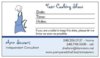
The cards have the "show info" area on them, but on the front - that way I didn't have to pay for the back printing (although I did splurge on foil).

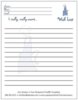
I'm going to put the note pad sheets into my guest folders, so my guests can write out their wish lists (easier, I think, than trying to find stuff on the one that's attached to the order forms).
 

Attachments

  • VistaCard1.jpg
    VistaCard1.jpg
    21 KB · Views: 811
  • VistaPad1.jpg
    VistaPad1.jpg
    15.9 KB · Views: 544
chefann said:
OK- I just ordered some cards and note pads. Feel free to steal these ideas.

The cards have the "show info" area on them, but on the front - that way I didn't have to pay for the back printing (although I did splurge on foil).

I'm going to put the note pad sheets into my guest folders, so my guests can write out their wish lists (easier, I think, than trying to find stuff on the one that's attached to the order forms).

Ann I really like your design on the card!!! How did you get it to do that??
 
hoosierchef said:
Ann I really like your design on the card!!! How did you get it to do that??


Yes! Please tell us how to do it! I LOVE your cards and I just looked at Vista put can't figure it out...
 
rebeccastt said:
Yes! Please tell us how to do it! I LOVE your cards and I just looked at Vista put can't figure it out...

I got my cards from Vista print, but they had spaces you had to use to put your information in.......

Are these custom designs?
 
I used the Premium Cards, deisgn your own logo. Once you get through that, it brings up some cards using the logo. I selected the one with the bottom portion shaded and just modified what went where.

I skipped the address, obviously, and used "Your Cooking Show" instead of the company name. Then I went into the "advanced editing" option to add another couple of text boxes for the actual show info. One of them is just:
Date:
Time:
Notes:​
And the other is a bunch of underscores (_) to create the lines. Then I moved that one so that the lines matched up with the words.

I splurged on the foil because the whole bottom portion is foil, so it will be very noticeable. And I stuck with the matte paper, so that it's easier to write the show info without it smudging.

(The underscore trick is also how I did the lines on the notepad.)
 
Thanks for your help Ann! I just ordered my cards, although I couldn't figure out how to add the registered trademark.

I just tried to add it here, holding down the alt key while typing 0174 to no avail. I also tried to add it on Vista, but I did not see the symbol button. I looked at every button listed and it was not there!

Uggh!
 
chefann said:
I used the Premium Cards, deisgn your own logo. Once you get through that, it brings up some cards using the logo. I selected the one with the bottom portion shaded and just modified what went where.

I skipped the address, obviously, and used "Your Cooking Show" instead of the company name. Then I went into the "advanced editing" option to add another couple of text boxes for the actual show info. One of them is just:
Date:
Time:
Notes:​
And the other is a bunch of underscores (_) to create the lines. Then I moved that one so that the lines matched up with the words.

I splurged on the foil because the whole bottom portion is foil, so it will be very noticeable. And I stuck with the matte paper, so that it's easier to write the show info without it smudging.

(The underscore trick is also how I did the lines on the notepad.)

AWESOME. I'll have to try that next time.
 
rebeccastt said:
Thanks for your help Ann! I just ordered my cards, although I couldn't figure out how to add the registered trademark.

I just tried to add it here, holding down the alt key while typing 0174 to no avail. I also tried to add it on Vista, but I did not see the symbol button. I looked at every button listed and it was not there!

Uggh!

Rebecca, I just copied and pasted what I saw from someone else on here. I know it's too late, but maybe next time. :D
 
Thanks Tammi....maybe next time!
 
Those are AWESOME, Ann! I am totally going to steal that idea! I take it they were not the free ones, though?
 
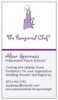
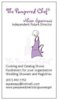
So I borrowed a bit from Ann :p and here a the 2 business cards I am debating between... any comments?
 

Attachments

  • Business Card 1.jpg
    Business Card 1.jpg
    18.6 KB · Views: 547
  • Business Card 2.jpg
    Business Card 2.jpg
    18.3 KB · Views: 577

Frequently Asked Questions

What types of free products does VistaPrint offer?

VistaPrint often provides a selection of free products, which can include business cards, postcards, flyers, and other promotional materials. The specific items available for free can vary based on current promotions, so it's a good idea to check their website regularly.

Do I have to pay for shipping on free items from VistaPrint?

Yes, while some items may be free, you will typically need to pay for shipping. The shipping cost can vary depending on the size of your order and your location, so be sure to review the shipping options before completing your order.

How can I find out about current free offers from VistaPrint?

You can find current free offers by visiting the VistaPrint website and checking their promotions or deals section. Additionally, signing up for their newsletter can keep you informed about special offers and discounts.

Are there any limitations on the free items I can order from VistaPrint?

Yes, there are often limitations on the quantity and types of free items you can order. For example, you may only be allowed to order a certain number of free business cards or other promotional materials per customer. Always check the terms and conditions for the specific promotion.

Can I customize the free products I get from VistaPrint?

Yes, you can customize most of the free products offered by VistaPrint. This includes adding your own text, images, and branding elements to ensure that the materials fit your business needs. Just keep in mind that some customizations may incur additional costs.

Similar Pampered Chef Threads

  • heather9892
  • Business, Marketing and Customer Service
Replies
8
Views
2K
PChefPEI
  • chefkristin
  • Business, Marketing and Customer Service
Replies
2
Views
1K
jrstephens
Back
Top