Going Paperless: Tips for Organizing Electronic Files

Click For Summary

Discussion Overview

The thread centers around participants' experiences and strategies for transitioning to a paperless system for organizing electronic files and managing schedules. Various methods and tools are discussed, along with personal challenges and successes in this process.

Discussion Character

  • Anecdotal
  • Opinion-based
  • Exploratory

Main Points Raised

  • One participant, identifying as a consultant, shares their decision to eliminate paper files and use an electronic organizer combined with Outlook for scheduling.
  • Another participant expresses admiration for those going paperless and shares their own limited experience with electronic organization.
  • Several users mention their reliance on digital calendars and task management systems like Entourage and Outlook, highlighting features such as color-coding and task reminders.
  • One participant discusses their struggle with organizing leads and customer care without a fully electronic system, mentioning their current method of using a binder for leads.
  • Another participant notes their ongoing transition to paperless and expresses a desire to streamline their organization further.
  • Some participants discuss technical issues related to accessing Outlook on their computers, particularly those using older operating systems like Vista.
  • One participant shares their experience of needing to maintain a clutter-free environment due to their house being on the market, which has motivated their shift to electronic organization.

Areas of Agreement / Disagreement

Views differ on the ease and feasibility of going completely paperless, with some participants expressing confidence in their electronic systems while others share hesitations and challenges.

Contextual Notes

Participants are primarily Pampered Chef consultants discussing their personal experiences with electronic organization tools and methods, reflecting a range of comfort levels and technical capabilities.

Who May Find This Useful

This discussion may be of interest to consultants looking for personal experiences and insights on transitioning to a paperless system for managing their business activities.

PamperedK
Silver Member
Messages
1,126
So I've decided to do it. I'm going to get rid of my paper files and even my paper calendar!!! I bought an electronic organizer and I'm going to use it to keep track of appointments, shows, etc... combined with Outlook on my PC.

I need to organize my electronic files now. They're so cluttered it's ridiculous.

Any tips on being paper free??
 
You are more brave than me!
 
I am pretty much paper free. Limited space will do that to you!!!Great job on going electronic for everything! What kind of electronic organizer did you get? I use the consultant planner at shows only... I keep everything on my calendar on my computer. I also use Entourage (Mac's version of Outlook) so I can share with you how I use that if you'd like.I'm also happy to share some other ideas that I have that I'm using... let me know where you are struggling with the paper and I'll share with you what I am doing with that!
 
  • Thread starter
  • #4
finley1991 said:
I am pretty much paper free. Limited space will do that to you!!!

Great job on going electronic for everything! What kind of electronic organizer did you get? I use the consultant planner at shows only... I keep everything on my calendar on my computer. I also use Entourage (Mac's version of Outlook) so I can share with you how I use that if you'd like.

I'm also happy to share some other ideas that I have that I'm using... let me know where you are struggling with the paper and I'll share with you what I am doing with that!

I bought an iPod Touch. I was thinking of keeping a planner for shows, but I know I would forget to transfer something. I take my laptop to my shows anyway so I can just pull up outlook and book shows on there. I'll also keep a list of open dates w/in the next 2 months so I have quick reference.

I'd love tips on using Entourage / Outlook!!

Right now I have a binder that I keep all my leads in. Mostly they're trade show leads. I keep draw slips stapled to a piece of paper and file them behind monthly tabs. I'm not sure if I can go electronic with this since I have tons of people in that binder to call.

I'm not really sure what else I can do with electronic files. Right now for customer care, I just pile my receipts and pull a handful when I'm doing CCC. When I reach someone, if they don't end up being a booking or recruit lead, I shred their receipt. That seems to be working OK for now. I figure if I contact someone for Customer Care and they turn out to be a lead that requires definite follow up, I can add that into my calendar.

Any general tips or best practices you have are greatly appreciated.
 
  • Thread starter
  • #5
pamperedlinda said:
You are more brave than me!

I'm SCARED to do it but I'm going to try!!!
 
Good for you. I'm slowing shifting to electronic, but I don't know if I could go completely paperless. good for you!
 
Okay... let's see...In Entourage/Outlook... when I schedule a show, I put all of my host coaching duties in the Tasks. Each morning that is the first thing I check. I also color-code everything to make it easier on myself and my colors are consistent. Hosts are Green, Recruits are Light Green, TEAM is orange, personal is blue, etc. So once the show is scheduled I don't worry about doing anything until it pops up in the tasks. Also, I put reminders on the things I need and repeats on the things I do each week (recruit calls, customer care calls, team calls, etc).In the Notes section I keep track of all of my calls (again, color-coded). Hosts are green, recruits light green, booking calls are purple, team orange, etc. What's great about that is I can put in a name in the search box at the top and all the calls I have made to that person show up. In the notes section for each NOTE, I put in what the call was about and what happened along with phone numbers for easy reference.For the DPS that need to be followed-up with, I created a Project for them. That way I have no lingering slips around and all the info is there in one spot when I want to make calls. After I enter in the info from the slip (put the info into Entourage for further follow-up or into Constant contact for my newsletter), I shred the info.Deb J inspired me to use the 3-part order form. SO MUCH BETTER!!!! I use them at shows, mail the receipts to my hosts (they were misplacing them if I left them with her even in a file folder with PC on the tab). Once the show has shipped, I shred my copies. If someone needs a receipt, I print it off P3.I have a plastic bin with recruiting brochures, order forms, catalogs and anything else and that is it. It is stored away under a bed and comes out only when I need something.Before Consultant Connection, I was also using the Calendar to track my shows and my team's shows but don't need that part now.Also, BE SURE TO BACK UP WEEKLY!!!!! If not more frequently! ;)For customer care, I make all my calls sitting at my computer anyway... I open a show and click on Print Receipts... they open in a new window and just call from there... no need to have the paper copy to do that! Then I track the calls in the Notes section of Entourage. Why do you need the paper copies to make the customer care calls when all the info is on P3? :DI also have a file folder on my desktop (on the computer) that has all of the Host/guest specials in them so I can refer to them super fast as well.Hope that helps a little! :)
 
GREAT JOB GUYS!! OOooh that makes me want to be more organized!! I started using Google Calendar but got out of the habit of doing it. I should just do microsoft outlook. The weird thing is I have tried to find it on my computer and can't. Am I completely missing it? It's not under my menu/start tab. Maybe it didn't come with my computer. Plus I have Vista.:sick:
 
I thought Outlook came on all computers but I got mine with my Microsoft Office package. It's been a while since I've had a PC.
 
finley1991 said:
I thought Outlook came on all computers but I got mine with my Microsoft Office package. It's been a while since I've had a PC.
I thought so too. I'm so confused. It's not listed on my programs tab by the other Microsoft stuff (and that was stuff I had to buy like the Microsoft Office stuff and I bought some student version).

Anyone else have Vista? Maybe there's something screwy with that! Chances are, something is because I can't make my blackberry sync with it.


I love how organized you are, Colleen! I want to streamline stuff like that and get into a good routine like you have. I always strive to be more organized!!
 
Becky, it would be with your office suite :)
I am shifting to paperless and loving it. :) Thanks Colleen for the tips
 
Our house has been for sale for 3-1/2 years :( so not having clutter is an essential for showings. It's been great too because if I travel, I can just take my computer with me and I'm good to go. I won't be using the Notes section in Consultant Connection though because I already have my system in place with Entourage.On another note, I don't take my laptop with me to shows... a couple of bad experiences with host's and guests' kids using it and it was one more thing for me to carry.
 
  • Thread starter
  • #13
Becky, you probably have Windows Mail - that's the program that came with Vista. It's similar to Outlook but I prefer Outlook.

Colleen - I agree with you on CCC, but we don't have P3 in canada so inputting customer info isn't as easy. I've tried to put their phone number in while I enter the order but honestly - I'm far too unorganized / lazy for that. I don't like that I have to click an extra button to do it! haha

When you say you put a task in for host coaching, do you mean you would enter a new task with a deadline for the day you're supposed to do it? I'm trying to picture your program - any chance you want to post a screen shot?? haha

I'm very visual so I'm going to play around to see if I can get it to work.

I'm thinking for my team, I'm going to write notes right into the appointment in my calendar. So when I sit down to do a coaching call, I'll double click on their appointment in my calendar and type up my notes. Then at the end of the call, I'll just change the date to our next scheduled call. That way all the notes are in the appointment notes section and they move with the coaching calls. Does that make sense?

Does Outlook have a Notes section like Entourage? In Outlook I have a "post-it" type note section but I'm not sure I'm understanding how you use it.

We also don't have consultant connection...

I don't know that Outlook has a way to create "Projects" ... I wonder how I could do this???

Thanks so much for the notes!! I'm going to have to go through them and see what I can implement on this end.

Perhaps I should stop being so lazy and just enter phone numbers into PP. They've told us we are NOT getting P3 any time soon. :(
 
Let me run and look at Outlook on my mom's computer and come right back. And I'll explain how I do the host coaching tasks as well. Hold please....
 
  • Thread starter
  • #15
Thank you for doing this - I really do appreciate it! I wish I had my laptop here...I'm just playing with Outlook at work right now.
 
I love hearing all this too! :)

Yes, I do have Windows Mail. I don't use it and have never looked at it to see if it has a "task management" kind of thing. I wonder if there's a way to get Outlook even though I have Vista. I"ll have to look into it!
 
Okay... I'm back. Her Outlook does not have a Project option so I would create my Door Prize slips in a Note. (My mom's outlook does have a Notes section... it looks like a sticky note icon but when I click on it, a new window comes up that I can make notes in.) The header of each note is the Name of the person I am calling (color-coded) and in the actual notes section of the note, I put what the call was about. So when I look at the list of Notes, all I see are names... if they are orange, it's a consultant on my team, Purple is a booking call, Green are hosts, etc. So I can instantly tell what kind of call it was that I made to that person.Before P3, I did the same thing with my customer care calls... just opened the receipts on my computer and called from there. Yes.. you will need to put in the info to do that, but it's not a bad habit to get in anyway... why wouldn't you want all of the info in one place to begin with? Cuts down on time looking for stuff... just a suggestion. (Also, keeps me from procrastinating on my customer care calls because I would not do them because it took me so long to get all the info together to call!) :DFor Host Coaching... when I schedule a show this is how I break it down and put it into my Tasks. I set the date first and then back up from there... someone sets the date for June 18th... Call #1 as reminder to get guest list to me - 5/28
Send Invites/Host Packet - 6/4
Call #2 to go over host packet - 6/9
Send opportunity info - 6/11
Call #3 to get headcount - 6/16
Show date - 6/18
Close show - 6/22All of that goes into the tasks. So I don't do anything until it pops up on the 28th that I need to get her guest list if I don't already have it.On a personal note, whenever I get a reminder card for an appointment, I leave it on my desk and once I enter it into my calendar, I throw the card away. That way if the card is laying around, just like the prize drawing slips, I know it's not in the computer. I find if I have too much stuff around that I can't focus on the task at hand. It's easier for me to have all of my info in ONE SPOT. I know where to go to get whatever I need and I'm not endlessly searching for something. Plus, if it's in the computer, you can always use the SEARCH function to find anything anyway. Last time I checked, there was no search function to find slips of paper piled on our desks!!!! :pIt will take some work on the front end to do all of this but it's so worth it! And I have a clean desk every morning when I get in to get started and I love that.
 
  • Thread starter
  • #18
pamperedbecky said:
I love hearing all this too! :)

Yes, I do have Windows Mail. I don't use it and have never looked at it to see if it has a "task management" kind of thing. I wonder if there's a way to get Outlook even though I have Vista. I"ll have to look into it!

There sure is! I have Outlook 2003 as well as Windows Mail on my computer. My dad installed it for me though so I'm no help with that!
 
  • Thread starter
  • #19
Ok I'm understanding now...So even if you have 50 people who will "some day" book a show but haven't said WHEN would you create a note for each of those people? I do like how I can just flip through my binder quickly and knock off 10-20 calls at once. If using notes on the computer would be as easy, I'd be happy spending the time setting it up. I just don't want it to get lost. I would fill up my whole screen with notes really quickly!

I meet a lot of people at trade shows so I have a ton of yes's that I haven't been able to contact so who knows when they'll actually book.

Does that make sense/

I'm loving the host coaching tasks - I'm definitely going to do that!
 
PamperedK said:
Ok I'm understanding now...So even if you have 50 people who will "some day" book a show but haven't said WHEN would you create a note for each of those people?

I wouldn't create a single note for each one... I would create a Note for Cooking Show leads, then Trade Show leads, etc.

I'm going to try to post my pics here so you can see what it looks like...

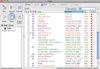
The pic attached here is of my Notes... you can see the colors and what they are. Then if I click on a name, a new window pops up with what occurred on the call. HTH!!!
 
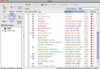
Here is a pic of my Tasks... hope you can see these and that they make sense!!! :)
 

Attachments

  • Picture 2.jpg
    Picture 2.jpg
    23 KB · Views: 363
  • Picture 2.jpg
    Picture 2.jpg
    23 KB · Views: 326
  • Thread starter
  • #22
that's great thanks!!!

So I'm picturing a note that says "Trade Show Leads" and inside, it would have each person's name and phone number and perhaps beside that, it would have my notes...something like this....

eta: I have no idea how to create thumbnails like that!
 

Attachments

PamperedK said:
that's great thanks!!!

So I'm picturing a note that says "Trade Show Leads" and inside, it would have each person's name and phone number and perhaps beside that, it would have my notes...something like this....

eta: I have no idea how to create thumbnails like that!


That would work! You could also create a *category* (with a color code ;)) for your slips.. that way you would see the person's name if that would be easier for you!

Glad I'm able to help out a little on this! It's just made my life so much easier!!!! My former director tried for YEARS to go electronic and paperless but it just did not work for her! The bottom line is we need to find what makes us most efficient and what feels comfortable for us. Always a work in progress!!!

Okay... back to the phones! :blushing:
 
  • Thread starter
  • #24
I'm a little overwhelmed. Maybe because I don't really understand how the categories work. I get colour coding and I do that with my calendar (green is shows, blue is office time, etc...) but I'm not sure how categorizing helps.

I'll have to play around a bit...I also want to see if PP will help me since I can make notes in there...maybe I upload all my booking leads to PP??

thanks for helping. Sorry I have so many questions...I just have no idea what I'm doing and I'm scared I'm going to lose something!
 
PamperedK said:
thanks for helping. Sorry I have so many questions...I just have no idea what I'm doing and I'm scared I'm going to lose something!


Take a deep breath... and take some time to think through and play around with it and you'll get it to where it works for you!!!!

Ask anything you want! I'm happy to help! :)
 
pamperedbecky said:
I thought so too. I'm so confused. It's not listed on my programs tab by the other Microsoft stuff (and that was stuff I had to buy like the Microsoft Office stuff and I bought some student version).

Anyone else have Vista? Maybe there's something screwy with that! Chances are, something is because I can't make my blackberry sync with it.


I love how organized you are, Colleen! I want to streamline stuff like that and get into a good routine like you have. I always strive to be more organized!!

I also have vista and since you bought the office suite student edition you should be able to go to your program files, open that folder and outlook should be in there. That is my set up and it sounds like what you have. HTH
 
Koolotus said:
I also have vista and since you bought the office suite student edition you should be able to go to your program files, open that folder and outlook should be in there. That is my set up and it sounds like what you have. HTH

Awesome, thanks. I will check that out!:D
 
For us Americans, a lot of tasks can be set up in P3 as well--no need to use Outlook.
 
finley1991 said:
My former director tried for YEARS to go electronic and paperless but it just did not work for her!

I am in awe of you all!! Afraid I fit in the catagory of your former director...
Signed,
The Paper Dinosaur!!
 
baychef said:
I am in awe of you all!! Afraid I fit in the catagory of your former director...
Signed,
The Paper Dinosaur!!

Nothing wrong with it! Do what works for you!!!! :D
 

Similar Pampered Chef Threads

  • imported_iteachurkid
  • Recruiting and Team Leaders
Replies
7
Views
1K
baychef
  • Monty060609
  • Recruiting and Team Leaders
Replies
2
Views
1K
NooraK
  • NooraK
  • Business, Marketing and Customer Service
Replies
7
Views
2K
NooraK
  • esavvymom
  • Recruiting and Team Leaders
Replies
11
Views
4K
esavvymom
  • chefsteph07
  • Business, Marketing and Customer Service
Replies
14
Views
2K
esavvymom
  • emo812
  • Business, Marketing and Customer Service
Replies
6
Views
2K
PChefPEI
  • babywings76
  • Business, Marketing and Customer Service
Replies
2
Views
1K
Admin Greg
  • manderyoder
  • Pampered Chef Booths
Replies
5
Views
21K
Chef Bobby
  • katie0128
  • Pampered Chef Shows
Replies
7
Views
1K
MGG
  • mrshamel3808
  • Business, Marketing and Customer Service
Replies
8
Views
2K
mrshamel3808
Back
Top