Effortlessly Share PDF Flyers on Facebook | November Host Special Guide

Click For Summary
SUMMARY

This discussion focuses on sharing PDF flyers for the Pampered Chef November host special on Facebook. Users previously utilized Adobe Reader to convert PDFs into JPEGs for posting, but recent changes have hindered this process. Participants share alternative methods, including scanning flyers into JPEG format and using photo editing software to add contact information before posting. The conversation also touches on the use of personal versus business Facebook pages for promoting Pampered Chef products.

PREREQUISITES
  • Basic understanding of Adobe Reader and its functionalities
  • Familiarity with JPEG file format and image editing software
  • Knowledge of Facebook page management and posting strategies
  • Experience with scanning documents and converting file formats
NEXT STEPS
  • Learn how to convert PDF files to JPEG using online tools or software
  • Explore effective strategies for managing a business Facebook page
  • Research best practices for creating engaging posts on social media
  • Investigate photo editing software options for adding branding to images
USEFUL FOR

This discussion is beneficial for new Pampered Chef consultants, social media marketers, and anyone looking to enhance their online presence through effective flyer sharing and engagement strategies on Facebook.

pctharper
Gold Member
Messages
280
How do you post the pdf flyers on CC to facebook? I was wanting to post the host special for November, but I can't figure it out. Help! TIA!
 
We used to be able to take a snapshot with Adobe Reader and then use that to create a JPEG for use on FB, but HO changed something in the files and we can no longer do that.
 
Luckily, I had .jpeg's of October and NovemberI scanned them into my computer when the changeover kit came.

These are the flyers as is, no editing at all, but you can upload them to FB or use them how you will
 
Last edited:
I will usually use my photo editing software to edit in my contact info before I post them. That's just me though. I was once told don't give people anything business related without your contact info on it. I do the same thing with FB. If I like something, I will copy and paste it, but I don't "share" as it sends people to the original person instead of me.
 
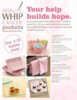
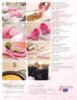
Does anyone have a Help Whip Cancer flyer already made to upload to FB? I tried messing with the pdf version, but I'm not quite savvy enough to get it to load. Thank you to all of you who go out of your way to help those of us who can't seem to grasp those computer skills :)
 
Thank you so much. I wish I were tech savvy!
 
I changed the HWC product flyers to JPEG's and uploaded them just a bit ago.
 

Attachments

  • HWC2011-1.jpg
    HWC2011-1.jpg
    30.8 KB · Views: 651
  • HWC2011-2.jpg
    HWC2011-2.jpg
    31.1 KB · Views: 617
Thanks so much! I appreciate the help on that one :)
 
Thank you!!!!! :)
 
Thank you!!!!!!!
 
I am a new consultant....does everyone use their personal Facebook page or did they create one for Pampered Chef??? I am trying to decide on that....
 
I created a fan page for my business. It's linked to my personal one, but this way I don't bombard my friends and family with PC stuff all the time. I don't bombard my customers all the time either. I try to post 2-3 useful household tips a day. If I post PC stuff, I count them as my 2-3 posts so that people aren't getting a bunch of stuff. My PC stuff gets snuck in with all the useful stuff this way.

Check it out for yourself https://www.facebook.com/Pampered.Chef.Powerhouse
 
Very cool!! Thank you for sharing that, gives me more of an idea on what to do. That will be the next project...lol Today was setting up the website and getting packets together for catalog show. Thanks again! :D
 
Any jpgs for Dec; Jan or Feb Host/Guest flyers?
 

Frequently Asked Questions

What is the purpose of the "Effortlessly Share PDF Flyers on Facebook | November Host Special Guide"?

The guide is designed to help Pampered Chef consultants easily share promotional PDF flyers on Facebook to attract hosts for the November special. It provides tips and strategies for maximizing engagement and interest in the offers available during that month.

How can I access the PDF flyers mentioned in the guide?

You can access the PDF flyers by visiting the official Pampered Chef website or your consultant portal. The guide typically includes links or instructions on where to find the latest promotional materials for sharing.

Are there specific Facebook groups where I should share these flyers?

Yes, it's recommended to share the flyers in relevant Facebook groups that focus on cooking, home goods, or direct sales. Additionally, consider sharing in local community groups or your personal network to reach potential hosts effectively.

Can I customize the PDF flyers before sharing them on Facebook?

While the PDF flyers are designed for easy sharing, some may allow for limited customization. Check the guidelines provided in the guide to see if you can add personal touches or specific details relevant to your audience.

What are some tips for engaging potential hosts when sharing these flyers?

To engage potential hosts, consider adding a personal message when sharing the flyer, highlighting the benefits of hosting, and encouraging questions. You can also share success stories or testimonials from previous hosts to build credibility and interest.

Similar Pampered Chef Threads

Replies
2
Views
4K
Admin Greg
  • kam
  • Pampered Chef Flyers
Replies
10
Views
4K
PCAnna
Replies
7
Views
6K
kam
Replies
4
Views
2K
ChefPeg
Replies
18
Views
4K
VeronicaW
  • lt1jane
  • Pampered Chef Flyers
Replies
2
Views
2K
lt1jane
  • kam
  • Pampered Chef Flyers
Replies
4
Views
4K
tpchefpattie
Replies
17
Views
5K
vminaudo
Replies
7
Views
3K
kam
  • mmilus
  • Pampered Chef Flyers
Replies
7
Views
3K
Loralee
Back
Top