How Can You Transfer Images from Photo Bucket Directly into Threads?

Click For Summary

Discussion Overview

The thread revolves around participants discussing the process of transferring images from Photo Bucket into forum threads, as well as sharing compliments about images posted by one participant, Heather, featuring her daughters.

Discussion Character

  • Anecdotal
  • Exploratory

Main Points Raised

  • One participant shares a link to test image transfers from Photo Bucket.
  • Another participant mentions successfully posting one image but questions the status of another.
  • A participant suggests using HTML scripts for image posting.
  • One participant explains how to use the postcard icon for inserting [IMG] tags in the URL.
  • Several participants express admiration for Heather's daughters, describing them as beautiful and adorable.
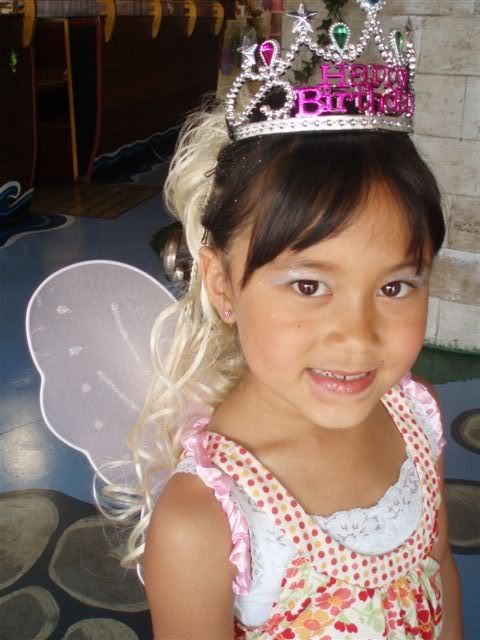
  • Heather shares that the images were taken during her daughter's birthday party with a "glamour glitz" theme.

Areas of Agreement / Disagreement

There is no clear consensus on the best method for transferring images, as participants share different approaches and experiences. However, there is a general agreement on the admiration for Heather's daughters.

Contextual Notes

The discussion includes personal experiences with image sharing and compliments on family photos, reflecting a community atmosphere focused on sharing and support.

Who May Find This Useful

Participants interested in image sharing techniques and those who appreciate personal stories and family moments may find this thread engaging.

  • Thread starter
  • #2
IMG]http://i162.photobucket.com/albums/t271/heat123_2007/k.jpg[/IMG]

bglitz.jpg


hmm got one, wonder what happened to the other?
 
Use the html script insteadLOL As I posted it I saw you got it!!!
 
heat123 said:
Images removed to save bandwidth, and since you figured out what was missing. just testing photo buckets image transfers....hmm, how do you get the pic directly into the thread box???

You need to click on the little yellow postcard icon to put the
 
Last edited:
  • Thread starter
  • #5
k.jpg
 
  • Thread starter
  • #6
ok thanks, I think I got it!
 
Heather..they are BEAUTIFUL!!!!
 
How cute are they!!!! So beautiful! Thanks for sharing Heather!
 
What beautiful girls you have!
 
Very cute girls - thank you for sharing :).
 
Heather - they are so beautiful!! Thanks for posting - hope you are doing well:) We're going to miss you at conference!
 
They are dolls Heather!
 
they are so beautiful!
 
They're so pretty Heather! Were they dressed up for fun or for a party?
 
Awww...they are beautiful!
 
  • Thread starter
  • #17
PampMomof3 said:
They're so pretty Heather! Were they dressed up for fun or for a party?
Awwwhhh, Thanks ladies!
I was just testing some photo imaging and instead of doing myself:rolleyes:, I thought the girls would be much cuter!:p

This was for My DDs 6th birthday party (this weekend) for a "glamour glitz" theme at a place that's Called "Bears, Buddies and Toys boutique". You can choose from princess dress up with build a bear party, pajama party, tea parties, or this glam glitz where they get all dolled up! Too cute! The girls had a blast!:)
 
Very cute! Just like their mama!
 
How Adorable!!!!
 

Frequently Asked Questions

How can I transfer images from Photo Bucket to Threads?

To transfer images from Photo Bucket to Threads, first, log into your Photo Bucket account and locate the image you want to share. Click on the image to open it, then copy the direct link provided. Next, go to Threads and create a new post. Paste the copied link into the post, and the image should automatically appear.

Do I need to download images from Photo Bucket before uploading to Threads?

No, you do not need to download images from Photo Bucket before uploading them to Threads. You can directly copy the image link from Photo Bucket and paste it into your Threads post, which allows for a seamless transfer without the need for downloading.

What format should the images be in for Threads?

Images should ideally be in common formats such as JPEG, PNG, or GIF to ensure compatibility with Threads. Photo Bucket supports these formats, so you can easily share images in any of these formats without issues.

Can I transfer multiple images from Photo Bucket to Threads at once?

What should I do if the image does not appear on Threads?

If the image does not appear on Threads after pasting the link, ensure that the link you copied is a direct link to the image and not a webpage link. Additionally, check your privacy settings on Photo Bucket to make sure the image is publicly accessible. If the issue persists, try refreshing the Threads app or restarting your device.

Similar Pampered Chef Threads

  • heat123
  • General Pampered Chef Chat
Replies
2
Views
841
Admin Greg
Back
Top