Success! Mac Users Can Now Download P3 Update

Click For Summary

Discussion Overview

This thread centers around the recent availability of a P3 update for Mac users, with participants sharing their excitement and experiences related to the download and installation process. Many express their anticipation for the new features and discuss the implications for their work as Pampered Chef consultants.

Discussion Character

  • Exploratory
  • Opinion-based
  • Anecdotal

Main Points Raised

  • One participant, identifying as a consultant, expresses joy at discovering the "Download P3 for Mac" link and shares plans to back up their system before installation.
  • Another participant mentions their excitement about the update, noting that they had been considering using Parallels due to increased business demands.
  • Several users highlight the size of the download and the importance of backing up systems before installation.
  • One participant shares their experience with the installation process, noting features that allow for easier synchronization between P3 and Personal Web Site shows.
  • Another participant expresses frustration at missing the initial announcement and hopes for more information in the future.
  • One participant shares their confusion about the availability of the download link, reflecting on the excitement surrounding the update.
  • Another participant, who does not own a Mac, expresses happiness for those who have been waiting for the update.

Areas of Agreement / Disagreement

Views differ regarding the availability of the download link, with some participants noting it was missing at times, while others confirm its presence later in the discussion. No clear consensus emerges on the overall experience of the installation process.

Contextual Notes

Participants share personal experiences and expectations related to the P3 update for Mac, with discussions reflecting a mix of technical insights and anecdotal evidence regarding the installation process.

Who May Find This Useful

Consultants who use Mac systems and are interested in the P3 update may find the shared experiences and insights relevant to their own installation and usage considerations.

chefann
Gold Member
Messages
22,050
http://i210.photobucket.com/albums/bb315/chefann1138/smilies/s1gyahoo.gif There was another thread that mentioned an important update to P3 today, that HO recommended we download by using the "manual update" link on CC. So I went there, and, lo and behold, there's a "Download P3 for Mac" link! http://i210.photobucket.com/albums/bb315/chefann1138/smilies/s1gyahoo.gif

I am bouncing off the walls I'm so happy!!

http://i210.photobucket.com/albums/bb315/chefann1138/smilies/bliss.gif

I have it downloading (it's a .dmg - a disc image), but it's pretty huge (8.1 MB, and it's still looking, so it's probably much bigger). I recommend that Mac users do a system backup, a P3 backup, and then install it. I'll be doing that this afternoon, and I'll post results of my initial use after I play with it a bit.

Thanks, HO!
 
OMG!!!!! YAH!!!! YAH!!!!

I was just talking to my brother last night about getting Parallel since my business has picked up so much and restarting all the time was getting crazy!! I cannot wait to get home!!!!!

Let me know how it goes and if there's any weird things I need to do. I supposed I need to back up my PC P3 and then load Mac P3 and restore everything.
 
  • Thread starter
  • #3
It's a 66MB disc image, so allow a good chunk of time to download it. I'm going to log off in a couple minutes to back up my system (always a good idea before installing new software). I'll post back if there's anything weird about the install.
 
Hooray! Let me know how it goes! (Too bad I already bought the parallels and installed that before...I've been having trouble ever since we introduced Microsoft on this iMac and parallels doesn't have free tech support!)
 
  • Thread starter
  • #5
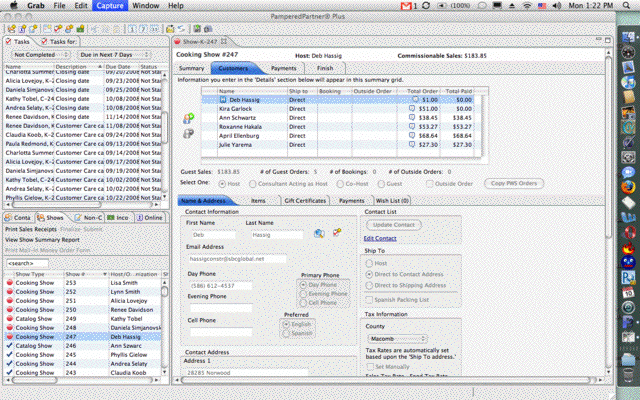
Lookie!!
P3Mac.gif
Parallels users please note that I am NOT running this through Parallels!! I think this version is a port/recompile of the latest Windows version, because it has the one chance to import from PP during install. Anyone who has been running P3 can skip that step and just do a restore from backup.There's also a "Set new shows up on PWS" option in the preferences. I think that's in the Windows version, too, but I didn't play with that one since I was so excited to get this!!You can't see it, but I'm bouncing around on the couch. :DI'm off to send a Thank You email to Tech support!(um, yeah... please ignore all the old tasks in my task list. I never used it because it was a pain to start up through Parallels. But I'm going to use it now!)
 
Hey - the nerds are happy!

4pjulo21.gif


smootches Ann!
 
WOW!! Awesome!

I can't believe they didn't make more of an announcement. I knew they were working on it - I am really psyched. Of course I've been using a PC laptop to do PC work on - and doing email and everything else on the Mac at home.

Now I'm going to have to start saving up for a Macbook - I'm too spoiled with using a laptop at shows...

Ann - let us know if there's any snags - but I would assume it will work great!
 
  • Thread starter
  • #8
Well, the link to the Mac version isn't there any more. So I have a feeling that it was posted accidentally and I just happened to catch it. I had heard a rumor a couple of weeks ago that the Mac version was going to be one of the NMD announcements. So maybe it'll be mentioned in tomorrow's NewsWire and the link back up later in the week.The tech guys are going to think I'm crazy, based on the thank you note I sent them. :)
 
  • Thread starter
  • #9
So, here's the scoop on the changes (based on the "what's new" link from the Mac version. (Gosh, I love being able to have it running on my primary OS.)
Version 3.0

We've enhanced the following:
  • PamperedPartner® Plus is now available for both Mac OSX 10.4 and above as well as for Windows Vista 64-bit.
  • You can now setup a Show in PamperedPartner® Plus that you have previously set up on your Personal Web Site with a just few clicks of your mouse and vice versa.
    • To do this for Shows on your Personal Web Site, just check the 'Create this Show in PamperedPartner® Plus' box on the Setup A Show/Edit Show screen. The next time that you run the Personal Web Site Synchronization process in PamperedPartner® Plus, all Shows that have this box checked will be created in PamperedPartner® Plus.
    • To do this for Shows you have setup in PamperedPartner® Plus, you will first need to ensure that your Host's Contact record is complete. Then click on the Summary Tab for that Show and check the 'Create this Show on my Personal Web Site' box. Please note that you will also need to set the time for the Show. The next time that you run the Personal Web Site Synchronization process, all Shows that have this box checked will be created on your Personal Web Site.
    • Refer to the instructions on the screens and the help for more information.
    • PLEASE NOTE: The recommended process for this new feature would be to first setup your Shows on your Personal Web Site and then use this new process to set them up in PamperedPartner® Plus when you are ready.
I am so excited that we can go both ways between P3 and PWS to create shows! No more typos because of double-entry!
 
Boy am I mad I missed that!
 
  • Thread starter
  • #11
It'll be up again soon.Otherwise, I'll sell CD's containing the download for $10 each. *giggle*And Boot Camp users, please note that you'll need to backup P3 to a place you can access it from within Mac OS. You can browse your Boot Camp partition, but it can get a little unwieldy. I recommend backing up to a flash drive.
 
Okay, I'm confused, is it still available?!?!?!??!?! I can only imagine you jumping on your couch. I've been thinking about it all day since you first posted!

Oops, you were posting while I was!
 
OH WOW OH WOW OH WOW!!!! My beloved i-mac bit the dust about a month ago, and since I have a school computer, I've been limping about without it. I actually have a new mac-book in my cart on the apple site, just haven't bit the bullet yet to press the "buy now" button. I was going to attempt the boot camp way to get to P3, which sounded like a pain, but not as much as a pain as using my in-laws computer to submit my shows. So Ann, if I understand correctly, as soon as I download this new version it will be "ready to go" on my new mac-book when I get it, nothing else to install or work around (like windows?) YEEHAW!
 
  • Thread starter
  • #14
That's right!The link still isn't there. I just checked (about a minute ago). Maybe later this week...(Unless I get a nasty phone call from Tech support asking me to uninstall it. But then they don't get the homemade cookies I promised them in my thank you email. ;) )
 
:( I was all excited to go home and install it!

Ann, quick question. I was looking online for a second charge cord to keep in my car to take to shows, the only ones that I had seen on there got really bad reviews, something about them burning up. Have you had any issues with this before with a Macbook?
 
  • Thread starter
  • #16
I don't have a second charge cord. When I took a laptop to shows, it wasn't on long enough to go through the charge (I'd leave it running in Parallels, but shut and asleep until I needed to enter orders). I don't take a laptop now - it's another thing to lug in, and another very valuable item that I don't want ruined or played with.If you're worried about the quality, you can get an Apple-branded replacement cord from any of a number of authorized Apple dealers. Possibly from an Apple store, too (although that's a dangerous place to enter LOL). You can probably find a lot of info on the MacNN forums (DH hangs out there a bit). If you don't currently have a MacBook, you should be aware that the power cord attaches with a unique magnetic end instead of the typical male/female connector.
 
I was just online on CC and in the P3 area the link for Mac's is there!!!!!

Don't own a Mac but happy for all of you Mac user's that have been waiting for this!
 
Great news for you Ann!!
 
chefann said:
I don't have a second charge cord. When I took a laptop to shows, it wasn't on long enough to go through the charge (I'd leave it running in Parallels, but shut and asleep until I needed to enter orders). I don't take a laptop now - it's another thing to lug in, and another very valuable item that I don't want ruined or played with.

If you're worried about the quality, you can get an Apple-branded replacement cord from any of a number of authorized Apple dealers. Possibly from an Apple store, too (although that's a dangerous place to enter LOL). You can probably find a lot of info on the MacNN forums (DH hangs out there a bit). If you don't currently have a MacBook, you should be aware that the power cord attaches with a unique magnetic end instead of the typical male/female connector.

I have a new MacBook so I use the one with the magnetic end (it's funny how it just snaps in). I actually do a power point presentation that I have running during my show. It goes over some of the benefits of starting your own PC business. I thought about changing it to go with the booking slide. Sometimes if I don't make sure it's charged before I leave then it won't stay charged for the whole show and taking orders. I was on the online Apple Store looking at ones that look just like the one that came with my laptop.
 
  • Thread starter
  • #20
Why don't you just take the one that came with your MacBook?
 
YAY!!! http://i57.photobucket.com/albums/g239/jessicafawn/smilies/hapydancsmil-1.gif
I've been saving for a new Macbook Air, it's super light weight, and was just waiting for PC to say "We're Mac compatible"...

I'm almost there to with all the commission I've saved!!! WOOOOO HOOOO!!!! I'm sooo excited!
 
chefann said:
Why don't you just take the one that came with your MacBook?

I usually do but a couple times I forgot about it so I thought about getting another one to keep in the car.
 
I'm on! I'm on! I just downloaded it (really quickly). Now I just need to retrieve all my stuff from the dark side and upload it!
 
  • Thread starter
  • #24

Turn away from the dark side, young padawan. We have cookies.
 
chefann said:

Turn away from the dark side, young padawan.

We have cookies.

I'm done, I'll never go back there again. Oh wait, I don't have office for my Mac yet so I might have to go back once in a while but I'm going to ask my brother if he has a copy for my Mac.
 
pamperedlinda said:
Hey - the nerds are happy!

4pjulo21.gif


smootches Ann!

watch it--:angel:
 
  • Thread starter
  • #27
wadesgirl said:
I'm done, I'll never go back there again. Oh wait, I don't have office for my Mac yet so I might have to go back once in a while but I'm going to ask my brother if he has a copy for my Mac.

Download Open Office. It's free, and can open and save Office-compatible files. Go to openoffice.org
 
Ann HELP!!! I came on CS cause I KNEW you'd be here as excited as me! BUT, I downloaded it but my backup file is a .dat file and it wants a .mdb file. HELP!!! I need to transfer my info!
 
chefann said:
Download Open Office. It's free, and can open and save Office-compatible files. Go to openoffice.org

Really? One more than for me to do today!
 
PamperedChefDebi said:
Ann HELP!!! I came on CS cause I KNEW you'd be here as excited as me! BUT, I downloaded it but my backup file is a .dat file and it wants a .mdb file. HELP!!! I need to transfer my info!

Are you trying to open the P3 file from the backuped file? What you need to do is open P3 on your Mac and at the top, the far right item is the Restore icon. This will allow you to open the backuped file.
 

Frequently Asked Questions

What is the P3 Update for Mac users?

The P3 Update is a software enhancement for Pampered Chef consultants that improves the functionality and performance of the P3 application on Mac computers. It includes new features, bug fixes, and overall improvements to streamline the direct sales process.

How can I download the P3 Update on my Mac?

To download the P3 Update on your Mac, visit the official Pampered Chef website or the consultant portal. Look for the downloads section and follow the instructions to install the latest version of the P3 application specifically designed for Mac users.

What are the benefits of the P3 Update for Mac users?

The benefits of the P3 Update for Mac users include enhanced performance, improved user interface, new features that facilitate easier order management, and better integration with other tools used in direct sales. These updates aim to provide a more efficient experience for consultants.

Is there a cost associated with the P3 Update?

No, the P3 Update is provided free of charge to all Pampered Chef consultants. It is part of the ongoing support and resources offered to help consultants succeed in their direct sales business.

What should I do if I encounter issues while downloading the P3 Update?

If you encounter issues while downloading the P3 Update, first ensure that your Mac meets the system requirements for the software. If problems persist, try restarting your computer or clearing your browser cache. For further assistance, contact Pampered Chef customer support for help with troubleshooting.

Similar Pampered Chef Threads

  • chefann
  • Pampered Chef Flyers
Replies
13
Views
3K
babywings76
Back
Top